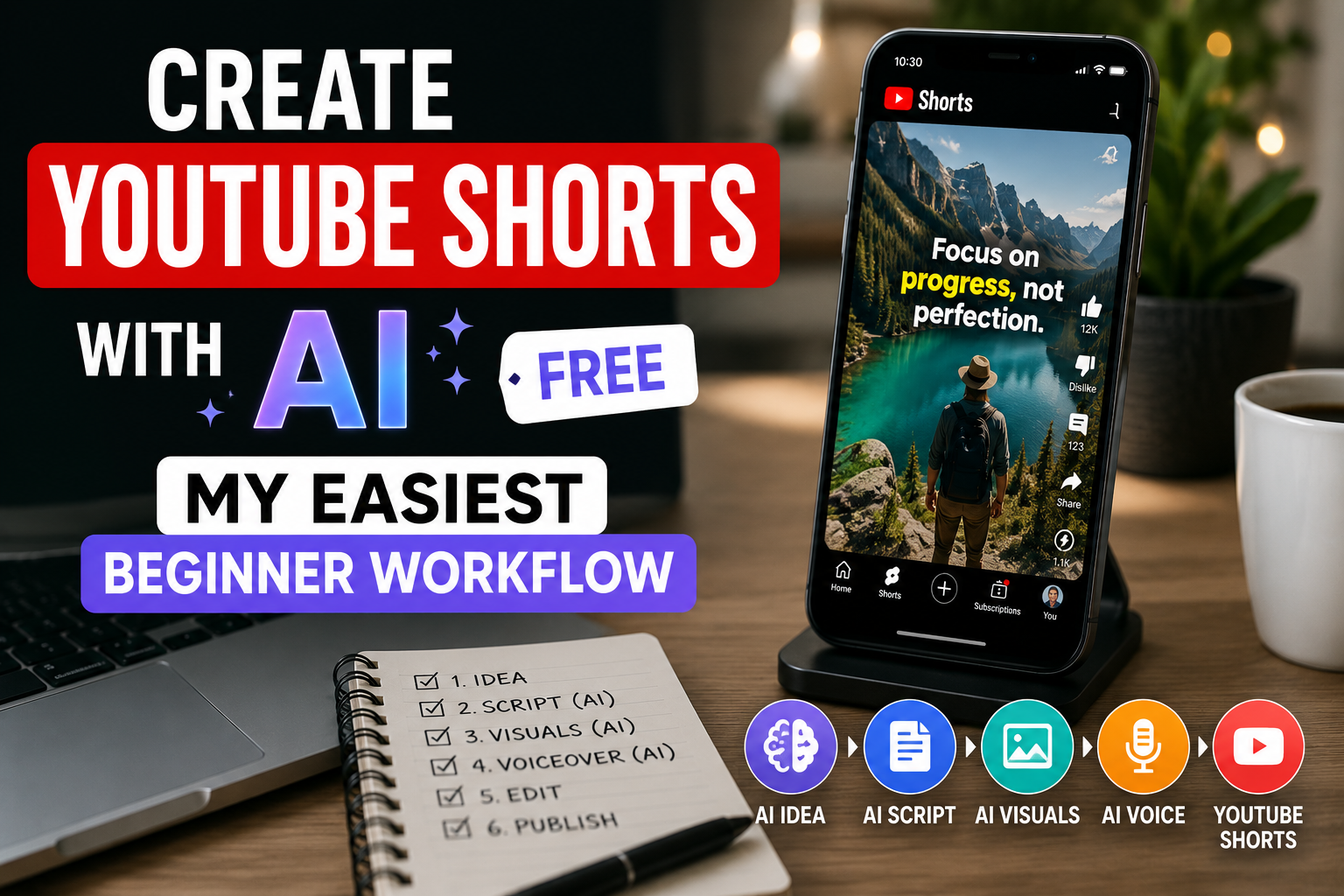
If you want to create YouTube Shorts with AI for free, the best move is not to overbuild the process.
You do not need a huge stack.
You need:
- one clear idea
- one short script
- one simple editing path
- captions
- fast publishing
That is what this workflow is built around.
Step 1: Pick an idea that fits short-form attention
Shorts work better when the idea is instantly understandable.
Good beginner angles:
- one mistake
- one simple tutorial
- one surprising fact
- one before-and-after
- one opinion with a sharp hook
Weak angle:
Let me explain everything about this topic.
Strong angle:
The beginner mistake ruining your Upwork profile
That is the kind of focus that works.
Step 2: Write a 20 to 45 second script
Keep it brutally simple.
Use this structure:
- Hook
- Point
- Quick example
- CTA
Example:
Hook:
Most beginners on Upwork lose jobs before they even apply.
Point:
Their profile headline is too generic.
Example:
“Hardworking freelancer” says nothing. “Blog writer for coaches” is much stronger.
CTA:
Save this if you want more freelance content tips.
That is enough.
Step 3: Use AI to speed up the script, not replace judgment
AI is useful here for:
- hook variations
- tightening wording
- shortening rambling scripts
- creating 3 to 5 headline options
But you still need to choose the cleanest version.
The goal is not to sound robotic. The goal is to sound clear fast.
Step 4: Build the video with a free-friendly tool path
A beginner-friendly free path can look like this:
- script in your notes app or writing tool
- visuals from stock, screenshots, or simple b-roll
- editing and captions in a free-capable video editor
If you want the easiest upgrade path once you outgrow a basic free setup, InVideo is still a strong option because it lets you move from script to finished video much faster than building everything manually.
Step 5: Keep visuals simple
You do not need complex footage.
Use:
- screen recordings
- stock clips
- text on screen
- simple motion backgrounds
- relevant screenshots
Shorts are often won by pacing and clarity, not by expensive visuals.
Step 6: Add captions before you export
Captions are not optional for most Shorts workflows.
They help with:
- retention
- clarity
- silent viewing
- emphasis
Free-friendly editors like CapCut make this pretty easy. Tools like InVideo can help if you want a more AI-assisted workflow.
Step 7: Make the first two seconds stronger
This is where many beginner Shorts fail.
If the opening is slow, the rest does not matter.
Ways to improve the first two seconds:
- start with the problem
- lead with the result
- cut empty setup
- put the key phrase on screen early
Weak:
Hey guys, today I want to talk about…
Better:
This mistake is making your blog harder to grow.
Step 8: Publish and repurpose
One Short can become:
- a Reel
- a TikTok
- a Pinterest Idea concept
- a LinkedIn text post
That is how you get more from the same effort.
My easiest beginner workflow in one view
Here is the exact low-friction version:
- Pick one idea with a clear result.
- Write a 4-part script.
- Grab simple visual support.
- Add captions.
- Export vertical.
- Repurpose to other short-form channels.
That is it.
What free users should expect
When you create YouTube Shorts with AI free, there are usually tradeoffs:
- limits on exports
- watermarks on some tools
- fewer premium assets
- slower workflow than paid plans
That is normal.
The goal of the free workflow is not perfection. It is momentum.
When it makes sense to upgrade
Upgrade when you want:
- faster output
- more polished templates
- easier script-to-video flow
- more reusable content production
That is the point where a tool like InVideo starts earning its keep.
Final thoughts
If you want to create YouTube Shorts with AI free, focus less on having the ultimate stack and more on having a repeatable workflow.
One idea. One script. One edit path. One clean publish.
That is how beginners actually start posting instead of endlessly preparing.
FAQ
Can I create YouTube Shorts with AI for free?
Yes. You can create Shorts using free-friendly tools for scripting, captions, and basic editing, though some platforms may limit exports or add watermarks.
What is the easiest AI workflow for YouTube Shorts?
The easiest workflow is to start with a short script, pair it with simple visuals, auto-caption it, and export vertical video.
Which tool is best for beginner Shorts?
Free-capable social editors are a good start, while tools like InVideo are strong upgrade paths for faster script-to-video output.
How long should an AI-made YouTube Short be?
For beginners, 20 to 45 seconds is often a strong range because it forces tighter hooks and clearer delivery.
FinanceHark Product
Get the full system behind clearer offers and stronger launches.
The FinanceHark Online Income System bundles the templates, scripts, prompts, and launch assets that make digital offers easier to build and sell.
- Templates, prompts, scripts, and workbook tools
- Instant access after successful payment
- Built for freelancers, creators, and digital sellers
Why this article is easier to trust
FinanceHark focuses on practical guides, transparent recommendations, and updates that make articles easier to use in the real world.
- Read how content is researched and updated in our Editorial Policy.
- See how affiliate relationships are disclosed on our Disclosure page.
- Use Start Here if you want a quicker route into the rest of the site.
Related reading